# Cowin-Scrape
Get the list of all latest vaccine information near you from Cowin India Website (https://www.cowin.gov.in/)
## ⚡️ Quick start
First of all, download and install [Python](https://www.python.org/downloads/) and your favourite IDE (I used [PyCharm](https://www.jetbrains.com/pycharm/download/#section=windows)) and install the packages given in the **[requirements.txt](https://github.com/Abhijith14/Cowin-Scrape/blob/master/requirements.txt)** file. Python Version `3.6` or higher is required.
Package installation can be done by using the [`pip install`](https://www.geeksforgeeks.org/how-to-install-pip-on-windows/) command:
```bash
pip install -r requirements.txt
```
Also, macOS and Linux users can check here to see [`pip install`](https://www.geeksforgeeks.org/how-to-install-pip-in-macos):
**Note** : It is recommended to create a virtual environment and install your packages inside the virtual environment
```bash
# Installing virtualenv
pip install virtualenv
# Creating virtual environment folder:
virtualenv venv
# Activating environment
# Windows
venv\Scripts\activate
# Mac / Linux:
venv/bin/activate
# Finally installing packages inside environment
pip install -r requirements.txt
```
Let's check your **Cowin Scrape variables**. Open [cowin_scrape.py](https://github.com/Abhijith14/Cowin-Scrape/blob/master/cowin_scrape.py)
```bash
clickDistOption = ""
clickStateSelect = ""
selectStateTarget = ""
clickDistrictSelect = ""
selectDistrictTarget = ""
searchBtn = ""
def init_var():
global clickDistOption, clickStateSelect, selectStateTarget, clickDistrictSelect, selectDistrictTarget, searchBtn
# initialising Cowin Variables
clickDistOption = '//div[@id="mat-tab-label-0-1"]'
clickStateSelect = '//span[@class="mat-select-placeholder mat-select-min-line ng-tns-c82-22 ng-star-inserted"]'
selectStateTarget = '//mat-option[@id="mat-option-17"]'
clickDistrictSelect = '//span[@class="mat-select-placeholder mat-select-min-line ng-tns-c82-24 ng-star-inserted"]'
selectDistrictTarget = '//mat-option[@id="mat-option-48"]'
searchBtn = '//button[@class="searchBtn pin-search-btn district-search"]'
```
As you can see, we need 6 variables.
| # | Variable | Type | Default | Description |
| ------ | --------------------------- | -------- | ------------------------------------------------------------------------------------------------------- | -------------------------------------------- |
| `1.` | `clickDistOption` | `string` | '//div[@id="mat-tab-label-0-1"]' | To click "Search by District" option. |
| `2.` | `clickStateSelect` | `string` | '//span[@class="mat-select-placeholder mat-select-min-line ng-tns-c82-22 ng-star-inserted"]' | To click State dropdown menu. |
| `3.` | `selectStateTarget` | `string` | '//mat-option[@id="mat-option-17"]' ( value for Kerala ) | To select State from the dropdown menu. |
| `4.` | `clickDistrictSelect` | `string` | '//span[@class="mat-select-placeholder mat-select-min-line ng-tns-c82-24 ng-star-inserted"]' | To click District dropdown menu. |
| `5.` | `selectDistrictTarget` | `string` | '//mat-option[@id="mat-option-48"]' ( value for Thiruvananthapuram ) | To select State from the dropdown menu. |
| `6.` | `searchBtn` | `string` | '//button[@class="searchBtn pin-search-btn district-search"]' | To click "SEARCH" button. |
Next, open Cowin Website ([`https://www.cowin.gov.in/`](https://www.cowin.gov.in/)) and fill in the variables according to respective state and district. Only Variables `selectStateTarget`, `selectDistrictTarget` are required to be changed.
**Step 1**: Inspect the website:
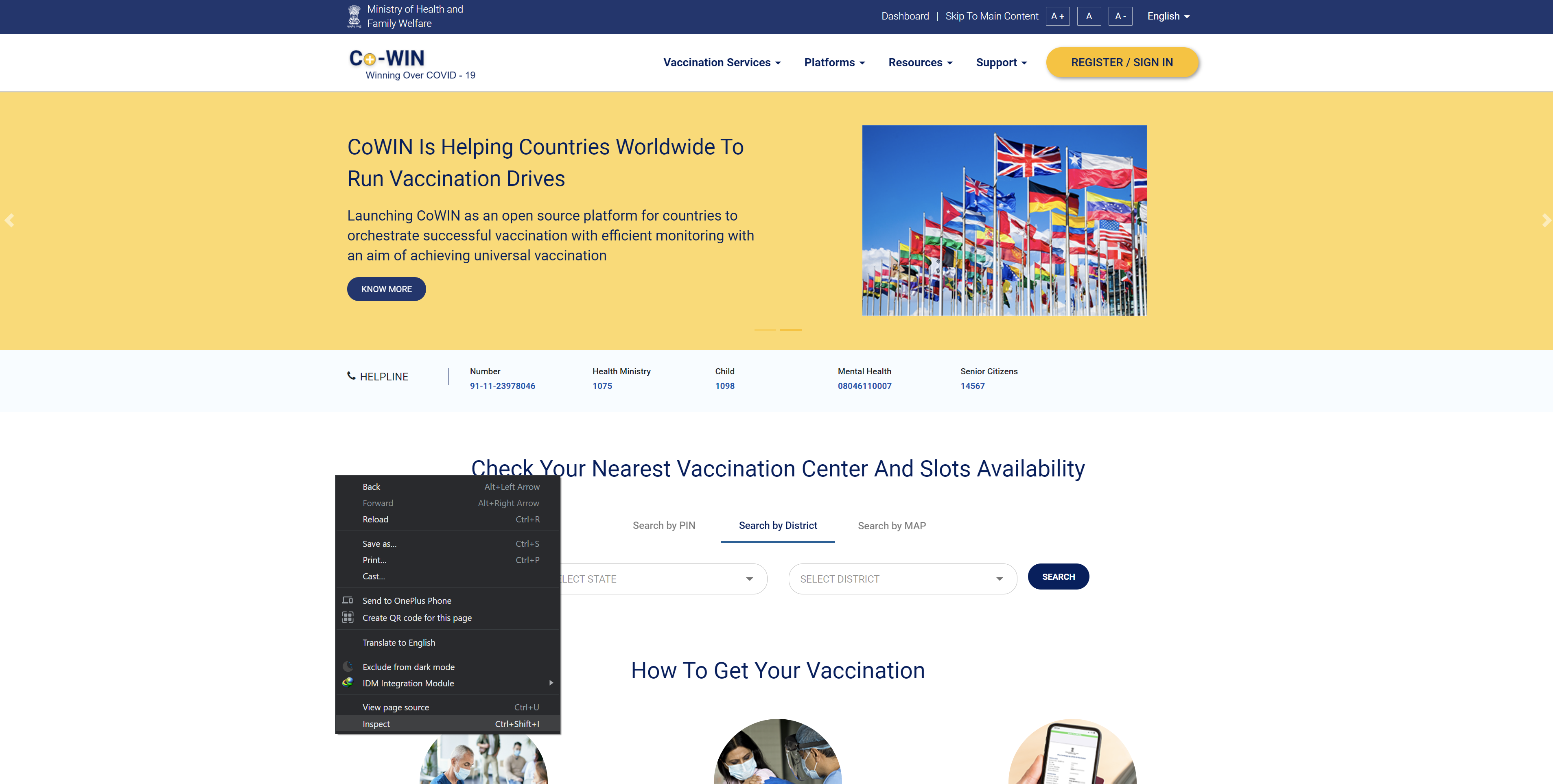
**Step 2**: Find your state and get the mat-option id:
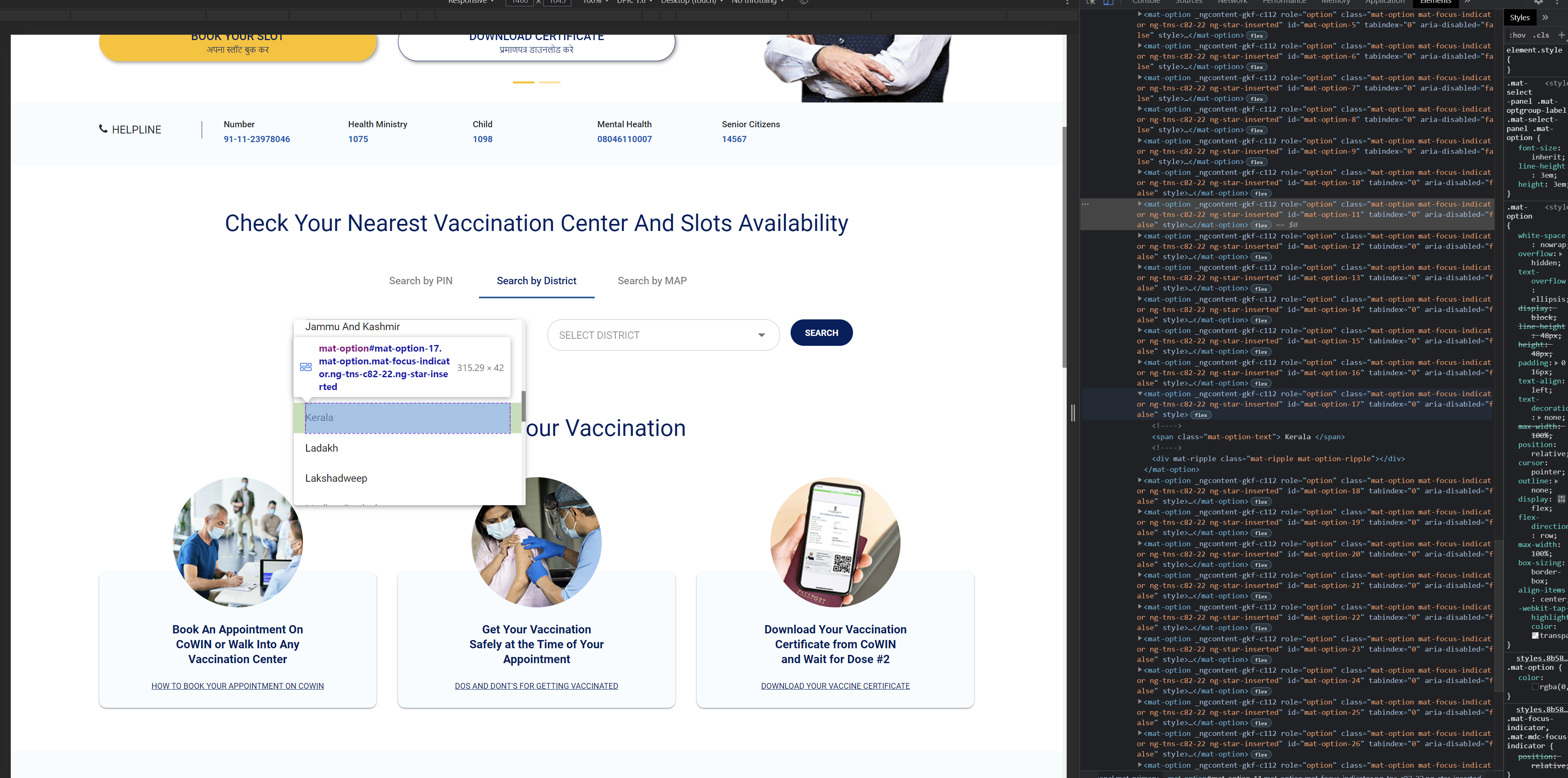
**Step 3**: Find your district and get the mat-option id:
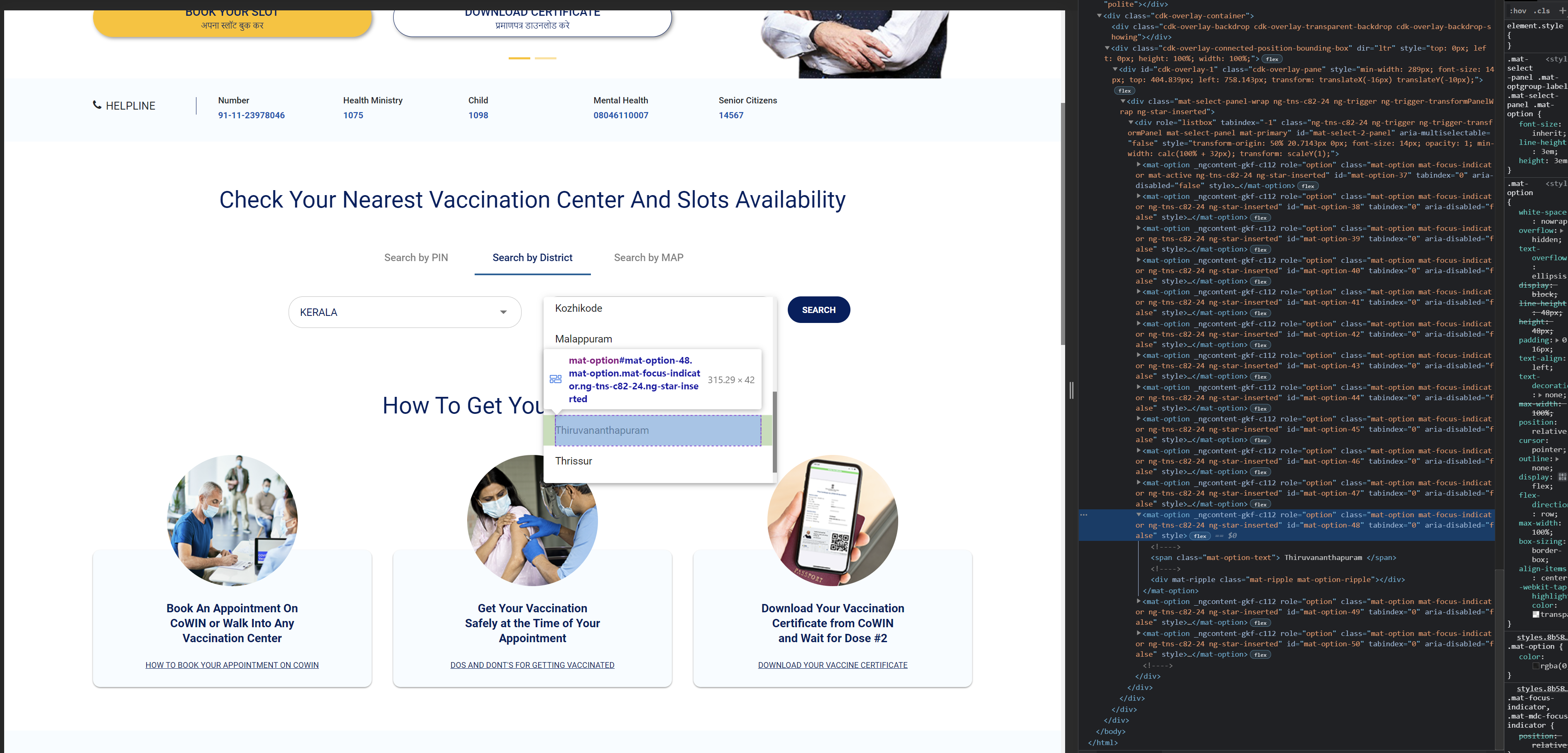
**Step 4**: After getting both state mat-option id and district mat-option id, pass it to the variables `selectStateTarget`, `selectDistrictTarget`
```bash
clickDistOption = ""
clickStateSelect = ""
selectStateTarget = ""
clickDistrictSelect = ""
selectDistrictTarget = ""
searchBtn = ""
def init_var():
global clickDistOption, clickStateSelect, selectStateTarget, clickDistrictSelect, selectDistrictTarget, searchBtn
# initialising Cowin Variables
clickDistOption = '//div[@id="mat-tab-label-0-1"]'
clickStateSelect = '//span[@class="mat-select-placeholder mat-select-min-line ng-tns-c82-22 ng-star-inserted"]'
# Add State variable
selectStateTarget = '//mat-option[@id="YOUR_STATE_MAT-OPTION_ID"]'
clickDistrictSelect = '//span[@class="mat-select-placeholder mat-select-min-line ng-tns-c82-24 ng-star-inserted"]'
# Add District variable
selectDistrictTarget = '//mat-option[@id="YOUR_DISTRICT_MAT-OPTION_ID"]'
searchBtn = '//button[@class="searchBtn pin-search-btn district-search"]'
```
That's all you need to do to start! 🎉
### 🚚 Get the list of all vaccines
If you basically need just the number of vaccines and its details from the website, run [main.py](https://github.com/Abhijith14/Cowin-Scrape/blob/master/main.py)
```bash
python main.py
```
> 🔔 Please note: You can create your own custom project from [main.py](main.py). Like getting vaccines from age group `18+` or get the details of only `SPUTNIK V` vaccine etc...
Such an example program can be found in [noisy_alert.py](https://github.com/Abhijith14/Cowin-Scrape/blob/master/noisy_alert.py) where it finds `COVISHIELD` and `SPUTNIK V` vaccines for the age group `18+`.
### 🚚 Get alert if a vaccine is available
[noisy_alert.py](https://github.com/Abhijith14/Cowin-Scrape/blob/master/noisy_alert.py) finds `COVISHIELD` and `SPUTNIK V` vaccines for the age group `18+` and starts playing sound (audio2.mp3) if a vaccine slot was available.
```bash
python noisy_alert.py
```
## ⭐️ Project assistance
If you want to say **thank you** or/and support active development of `Cowin-Scrape`:
- Add a [GitHub Star](https://github.com/Abhijith14/Cowin-Scrape) to the project.
- Tweet about this project [on your Twitter](https://twitter.com/intent/tweet?text=%E2%9C%A8%20Find%20Your%20Nearest%20Vaccination%20Center%20And%20Slots%20Availability%20using%20Cowin-Scrape.%20A%20Web%20Scraping%20project%20done%20using%20%23Python%20for%20%23Cowin%20%23India.%20%0A%0A%2B%20Faster%20%0A%2B%20User-Customizable%20%0A%2B%20Notification-Support%20%0A%0AJust%20Enter%20your%20State%20and%20District,%20%0ACowin-Scrape%20will%20take%20care%20of%20the%20rest.%0A%0Ahttps%3A%2F%2Fgithub.com%2FAbhijith14%2FCowin-Scrape).
- Write interesting articles about project on [Dev.to](https://dev.to/), [Medium](https://medium.com/) or personal blog.
Together, we can make this project **better** every day! 😘
### 🛠️ Built With
* [Python 3.8](https://www.python.org/) - Creating Project
### ❤️ Authors
* **Abhijith Udayakumar** - *Design & Development* - [Abhijith14](https://github.com/Abhijith14)
## 🚨 Forking this repo (please read!)
_**yes, with attribution**_.
I value keeping my work open source, but as you all know, _**plagiarism is bad**_. It's always disheartening whenever I find that someone has copied my work without giving me credit. I spent a non-trivial amount of effort building and designing this project, and I am proud of it! All I ask of you all is to not claim this effort as your own.
### TL;DR
Yes, you can fork this repo. Please give me proper credit by linking back to [Abhijith14/Cowin-Scrape](https://github.com/Abhijith14/Cowin-Scrape). Thanks!